Tinting settings
Every field on the Tinting settings page – deposits, booking key, payment gateways, financing, referrals, GPS, manager alerts, calendar feed and document wording.
What it is
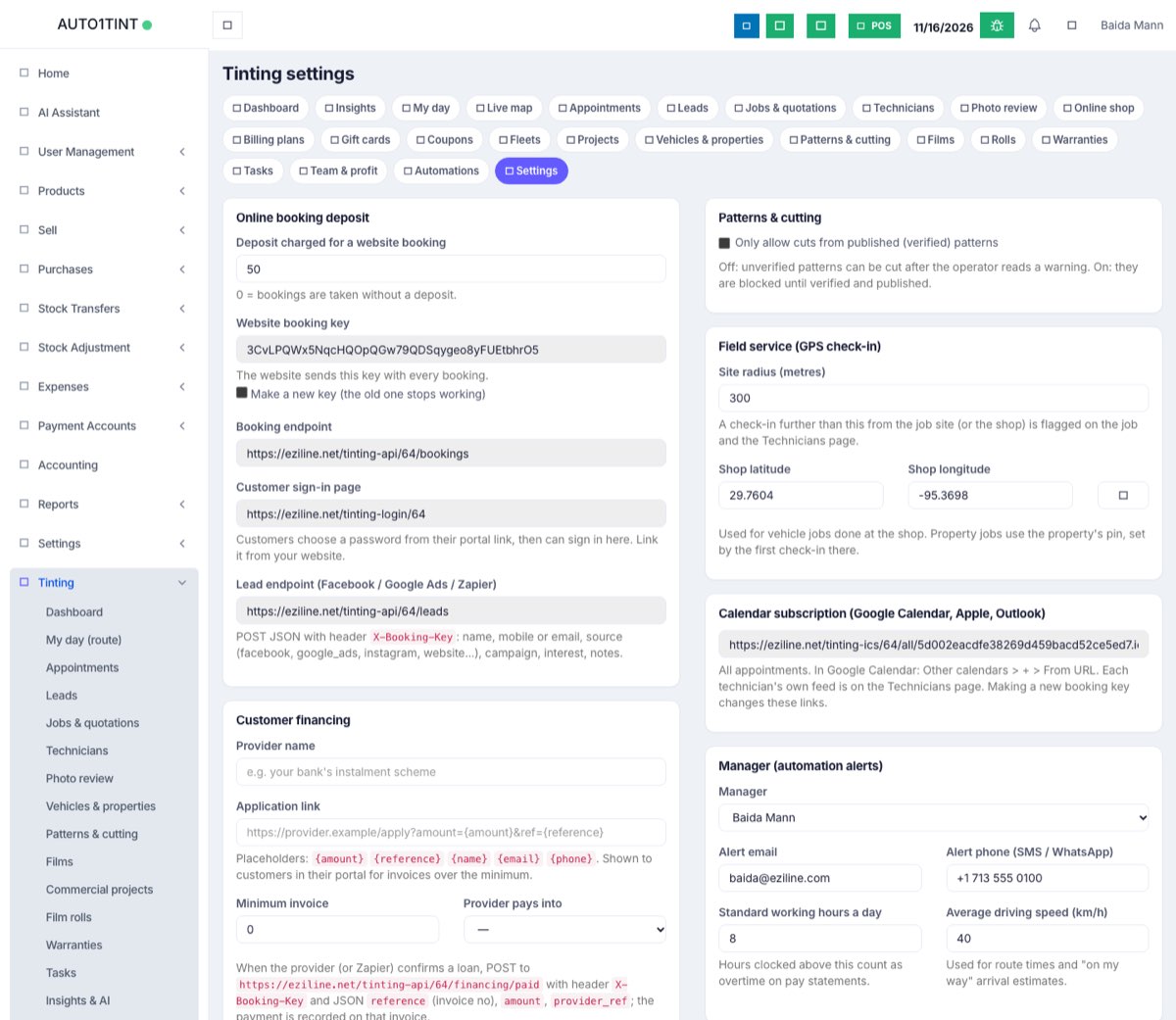
Tinting → Settings is one page that holds the shop-wide choices for the module: how much deposit website bookings take, the keys your website and payment providers use, the shop's GPS pin, who gets alerts, and the wording printed on quotations and warranties.
Who uses it
Owner or manager only. The page needs the tinting.manage permission; technicians do not see it.
Why it matters
Most "it doesn't work" problems with online booking, online payment and GPS check-ins come from a blank or wrong field here. Ten minutes on this page saves hours later.
How to use it
Open Tinting → Settings, change what you need and click Save settings at the bottom. You will see "Settings saved."
Left column
Online booking deposit
- Deposit charged for a website booking – amount taken when a customer books on your website. 0 = bookings are taken without a deposit.
- Website booking key – a long secret your website sends with every booking. It is created for you. Tick Make a new key (the old one stops working) and save if it ever leaks.
- Booking endpoint – the web address bookings are sent to (
/tinting-api/<your business number>/bookings). Copy it into the WordPress plugin – see Online booking. - Customer sign-in page – the address where customers sign in to their portal with email and password. Link it from your website. See Customer portal.
- Lead endpoint (Facebook / Google Ads / Zapier) – where other tools send new enquiries, using the header
X-Booking-Key. See Leads & CRM.
Customer financing
- Provider name, Application link (may contain
{amount},{reference},{name},{email},{phone}; must start withhttps://), Minimum invoice and Provider pays into (a payment account). Customers see the financing link in their portal for invoices over the minimum. When the provider confirms a loan, it posts to the "financing paid" address shown on the page and the payment is recorded on the invoice.
Referral programme
- Reward per referred customer – 0 = off. Given as a one-use coupon when the new customer's first job is completed.
- Reward valid for (days) – default 180.
- Booking page on your website – customers share this link with their referral code. See Coupons, referrals & gift cards.
Online payments
- Use – Whichever is set up (Stripe first), Stripe or Clover.
- Stripe: Secret key and Webhook signing secret. In Stripe add a webhook to the address shown, with event
checkout.session.completed, then paste its signing secret. - A status line shows whether keys are saved and which gateway is in use now.
Clover (card payments for deposits)
- Environment – Sandbox (testing) or Production (live).
- Merchant ID, Private API token, Webhook signing secret.
- Deposits are received into – the payment account deposits land in.
- In Clover: Settings › Ecommerce › Hosted Checkout › Webhook URL = the address shown. Without the signing secret no deposit is marked as paid.
Right column
Patterns & cutting – Only allow cuts from published (verified) patterns. Off: unverified patterns can be cut after a warning. On: they are blocked. See Cutting & plotters.
Field service (GPS check-in)
- Site radius (metres) – 50 to 20,000, default 300. A check-in further than this from the job site (or the shop) is flagged.
- Shop latitude / Shop longitude – press the crosshair button to fill in where your device is now, then save. Used for vehicle jobs done at the shop; property jobs use the property's own pin, set by the first check-in there. See Field service.
Calendar subscription – a read-only link with all appointments for Google Calendar, Apple or Outlook (in Google: Other calendars › + › From URL). Each technician's own feed is on the Technicians page.
Manager (automation alerts)
- Manager (defaults to the first admin), Alert email, Alert phone (SMS / WhatsApp).
- Standard working hours a day – default 8; hours above this count as overtime on pay statements (Team & pay).
- Average driving speed (km/h) – default 30; used for route times and "on my way" arrival estimates.
Plan usage – read-only bars showing how much of each plan limit you use. See Usage limits.
Document wording – Quotation terms and Warranty terms (up to 3,000 characters each), printed on quotations and warranty certificates.
Rules & limits
- Secret keys (Stripe secret, Stripe webhook secret, Clover token, Clover webhook secret) are stored encrypted and never shown again. The box says "Saved - leave blank to keep it"; leaving it blank keeps the saved value.
- Making a new booking key also changes the calendar feed links and stops your website and lead tools until you update them.
- Shop latitude needs a longitude too.
Tips
- Test with Stripe test keys or Clover Sandbox and one test booking before going live.
- If deposits are taken but never show as paid, the webhook secret is usually missing. See FAQ & troubleshooting.