Insights and the AI assistant
One page with your shop's key numbers, a clearly labelled revenue forecast, things that look wrong, and an optional AI assistant you can ask questions in plain English.
What it is
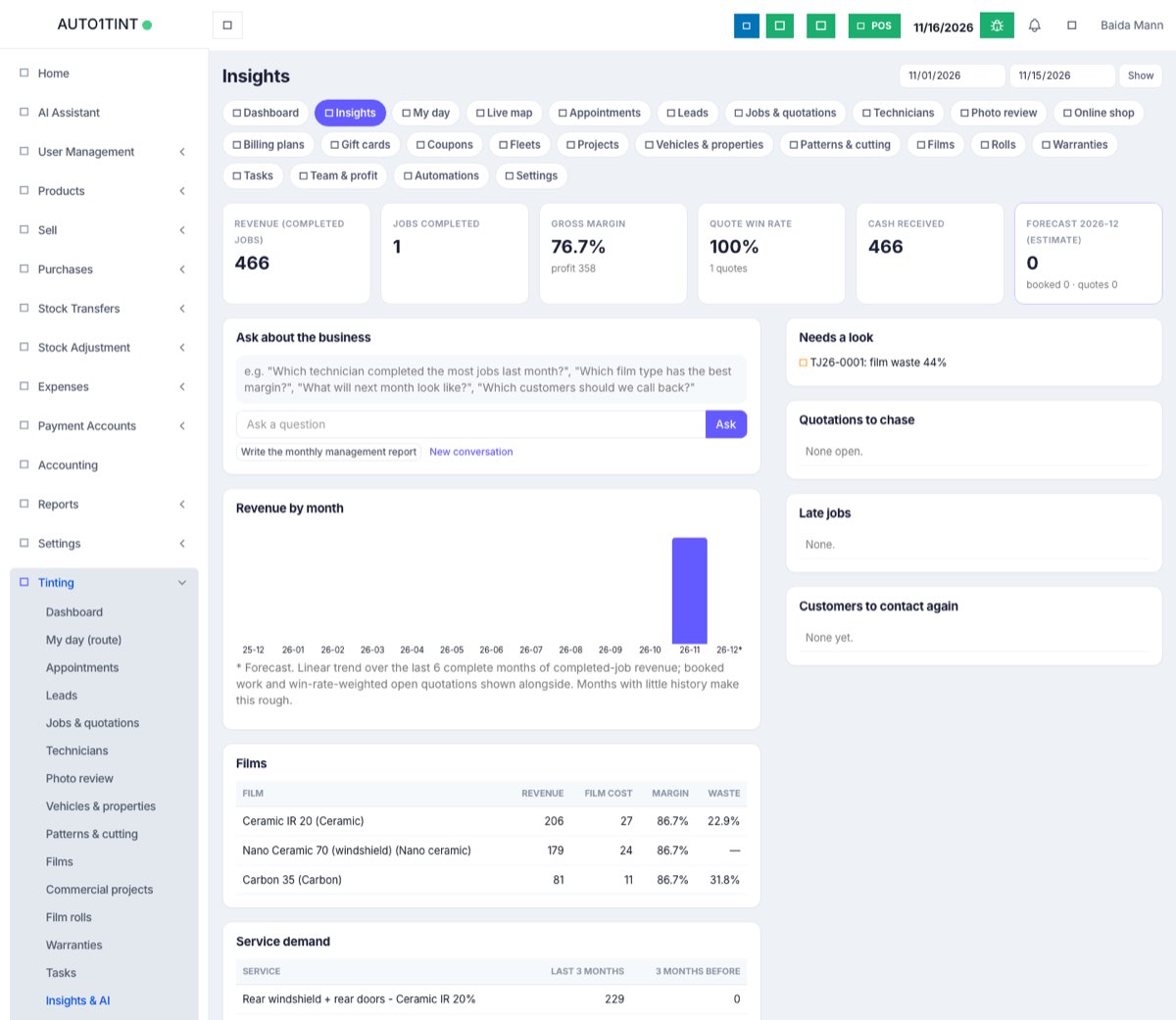
Insights is the manager's overview of how the tinting business is doing. Everything on it is worked out from your real jobs, invoices, film use and reviews. It has:
- Key figures for the dates you choose.
- Revenue by month for the last 12 months, plus next month's forecast.
- Films and Service demand tables.
- Needs a look (anomalies), Quotations to chase, Late jobs and Customers to contact again.
- An AI assistant that can answer questions and write a monthly report, if it has been set up.
Who uses it
- Owner / manager only. The page needs the tinting.manage permission. Technicians and front desk do not see Insights in the menu.
Why it matters
Owners rarely have time to build reports. Insights shows in one place whether the month is better than the last, which films and services earn most, which quotations are going cold, and which customers are due for a call, so you can act the same day.
How to use it
- Go to Tinting → Insights.
- Choose the from and to dates at the top and press Show. The default is this month.
- Read the key figure boxes:
- Revenue (completed jobs) with the change against last month.
- Jobs completed.
- Gross margin (price minus film cost minus commissions).
- Quote win rate (won quotations out of those answered).
- Cash received on tinting invoices.
- Forecast (estimate) for next month (the box names the month), with work already booked.
- Revenue by month shows bars for each month. The striped bar marked with * is the forecast.
- Films shows revenue, film cost, margin and waste per film. Service demand compares each service over the last 3 months against the 3 months before.
- Needs a look lists jobs from the last 90 days where film cost is over 80% of the price, the discount was over 20%, quality inspection sent the job back twice or more, film waste was over 35%, or photos look like re-uploads of earlier photos.
- Quotations to chase, Late jobs and Customers to contact again (last job 9–15 months ago, repeat customers, or a warranty ending in the next 60 days) are short to-do lists. Click through to the job or customer.
About the forecast
The forecast is an estimate, not a fact. It draws a straight trend line through the last 6 complete months of completed-job revenue. Next to it you see work already booked for next month and open quotations weighted by your recent win rate. With only a few months of history it is rough, and the page says so.
The AI assistant
- In the Ask about the business box, type a question such as "Which film gives the best margin?", "What will next month look like?" or "Which customers should we call back?" and press Ask.
- It looks up your figures with tinting tools (and the ERP's own tools) and answers, often with a small table.
- Press Write monthly management report for a ready-made report: headline figures against last month, next month's forecast, technician performance, best films and services, quotations to chase, late jobs, anything odd, and three recommendations backed by the numbers.
- Press New conversation to start again.
Honest note: the assistant only works if the server operator has added a valid AI API key (an Anthropic key in the server's settings). Without one, the box says The AI assistant needs ANTHROPIC_API_KEY in the server's .env file. Everything else on this page works without it. At the time of writing, the key on the hosted server still needs to be replaced with a valid one. Shop owners cannot add the key themselves; ask your EZI ERP provider.
The assistant is told to keep facts and estimates apart, to name the number behind every recommendation, and to say when there is too little data. Still, check important answers against the reports before acting.
Rules & limits
- Needs tinting.manage.
- Gross profit here is price − film cost − commissions. Wages and overheads are not included; see the ERP profit & loss.
- Questions are limited to 2,000 characters, and to 30 questions a minute.
- The conversation is kept only for your current sign-in session.
- AI answers depend on the API key and your AI usage allowance, which are managed outside the Tinting module.
Tips
- Record film used on every job (rolls); without it, margins look better than they are.
- Use Customers to contact again with an automation or a quick WhatsApp to bring back repeat work.
- For pay and per-technician detail, see commissions, tips and team pay.