Coupons, referrals and gift cards
Run discount codes, reward customers who send friends, and sell gift cards that are correctly held as money owed until they are spent.
What it is
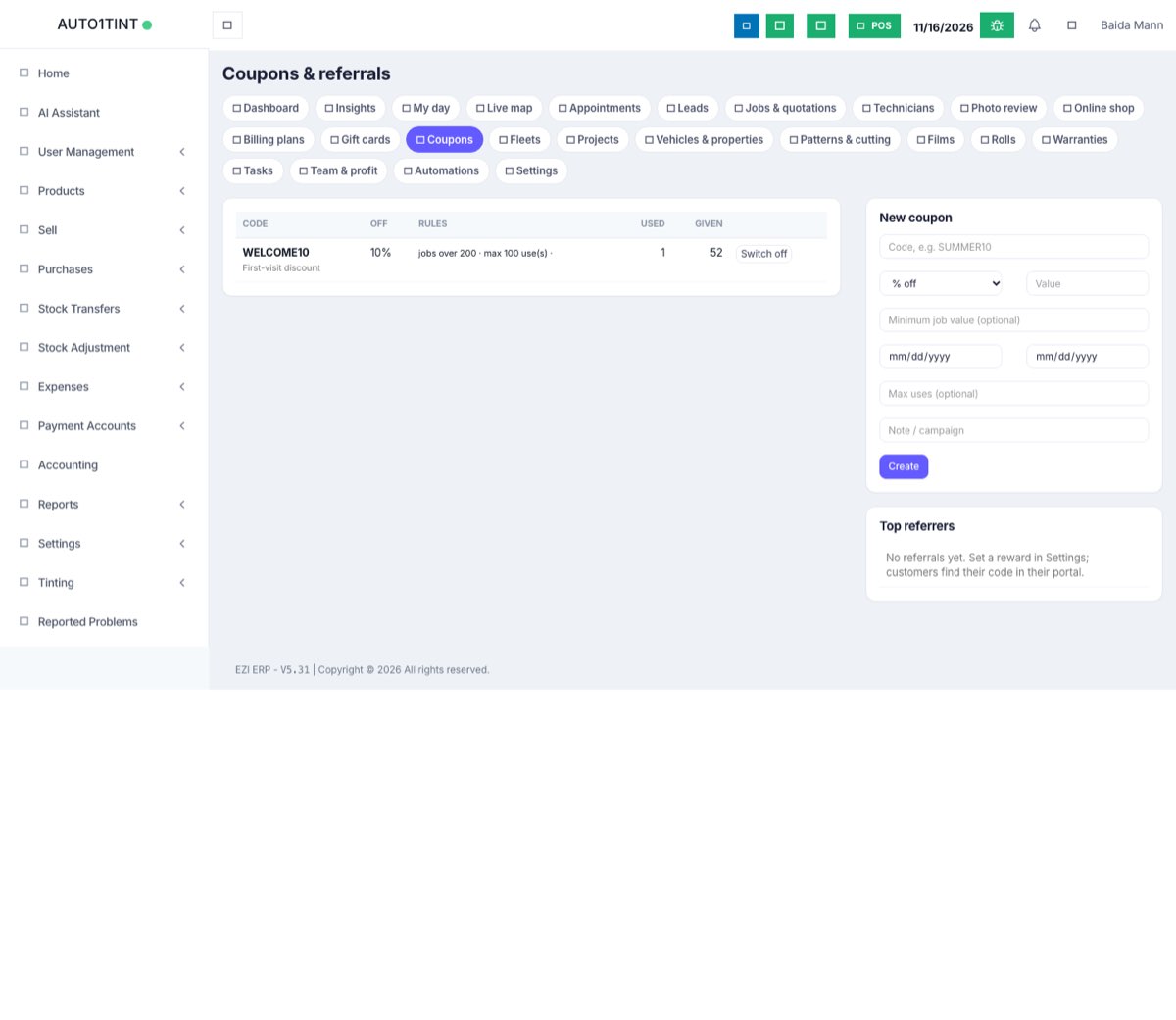
- Coupons are discount codes (for example WELCOME10) taken off a quotation: a percentage or a fixed amount.
- Referrals: every customer gets a personal code in their portal. When a new customer they referred has their first job completed, the referrer automatically gets a one-use reward coupon.
- Gift cards are sold for a value (codes like
GC-AB12-CD34) and later used to pay invoices, fully or in parts.
Who uses it
- Owner or manager creates coupons, sets the referral reward and sells gift cards.
- Front desk types coupon codes on quotations; managers redeem gift cards on invoices.
- Customers enter codes in the online shop and share their referral code.
Why it matters
Coupons let you measure campaigns (how many uses, how much given away). Referrals reward word of mouth, the cheapest source of tint customers. Gift cards bring cash in now, and the books show it as money owed to customers until the work is done, not as a sale.
How to use it
Create a coupon
- Go to Tinting → Coupons.
- Under New coupon enter the Code (letters, numbers,
-and_; saved in capitals). - Choose % off or Amount off and the Value.
- Optional: Minimum job value, from and until dates, Max uses, and a Note / campaign.
- Click Create.
The table shows each code, discount (Off), Rules, Used and Given (total discount). Switch off / Switch on pauses a coupon without deleting it.
Use a coupon
- Staff type the code in the coupon field when creating or editing a quotation (see Quotations and jobs). In our test shop, WELCOME10 brought quotation TJ26-0001 to $466.20.
- Customers type it in the online shop cart and see the discount at once (see Online booking).
Referral programme
- In Tinting → Settings → Referral programme set Reward per referred customer (0 = off), Reward valid for (days) (default 180) and Booking page on your website.
- Customers see their code under Invite a friend in the portal and can Share on WhatsApp.
- The new customer gives the code on the website booking form or in the online shop, or staff pick the referrer in Referred by (customer) on the lead.
- When that new customer's first job is Completed, the referrer gets a fixed-amount coupon starting with
REF, usable once and only by them. A task is created for the manager to tell them about it.
Top referrers on the Coupons page shows who sent the most customers and how many were won.
Sell a gift card
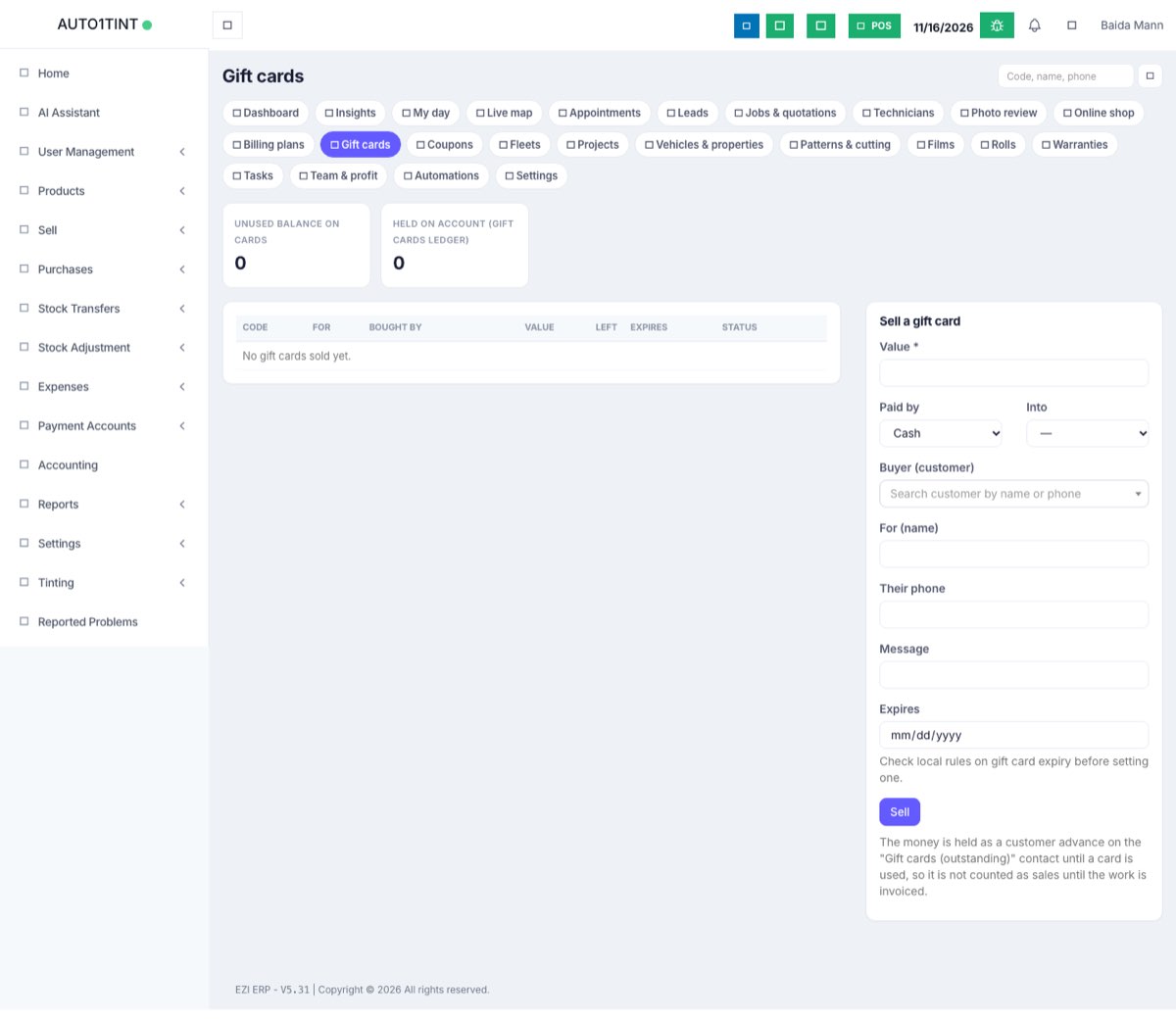
- Go to Tinting → Gift cards and use Sell a gift card.
- Enter Value, how it was Paid by (Cash, Card, Bank transfer, Cheque, Other) and the payment account it went Into.
- Optional: Buyer (customer), For (name), the recipient's phone, a message and an expiry date.
- Save. The card gets a code and you can Print gift card.
The page shows Unused balance on cards and Held on account (Gift cards ledger); these two should match. You can search cards by code, name or phone.
Redeem a gift card
- Create the invoice for the job first.
- On the job page, in the invoice box, type the Gift card code and the amount (it starts at the balance due) and click Use gift card.
- You see how much was paid and what is left on the card. A card at zero becomes used.
Rules & limits
- Coupon codes must be unique: "That code is already used." A percentage can't be over 100.
- When a coupon can't apply, the reason is shown, for example "Coupon not applied: that coupon expired on …", "…needs a job of at least …", "…has been used up", "…belongs to another customer", "…is switched off", or "there is no coupon …".
- The discount is never more than the job total. Rejected and cancelled jobs don't count as uses.
- Only one referral reward per referred customer, ever; customers can't refer themselves.
- Gift cards must be worth at least 1, and an expiry date must be in the future. Redeeming fails with "Create the invoice first.", "Nothing is due on this invoice.", or "This gift card cannot be used (expired)."
- Gift card money sits on a contact called Gift cards (outstanding) as a customer advance. Redeeming moves it to the customer and pays the invoice by "advance", so revenue is counted once, on the invoice.
- Coupons, gift cards, redeeming and the referral settings need
tinting.manage.
Tips
- Use one short code per campaign (SUMMER10, GOOGLE15) and check the Used column to see what worked.
- Add a minimum job value so big discounts only go on bigger jobs.
- Gift card codes typed in the online shop are only noted on the booking; redeem them on the invoice when the job is done.